Smoke vs Sanity Testing A Complete Guide for Development Teams
Unsure about smoke vs sanity testing? This guide clarifies the key differences with real-world examples and helps your team choose the right approach.
The real difference between smoke and sanity testing comes down to two things: how wide you cast your net and when you do it. Think of smoke testing as a broad but shallow check. It's the first thing you do with a brand new build to answer one simple question: "Is this thing even stable enough to bother testing?"
On the flip side, sanity testing is a narrow and deep dive. You run this after a bug fix or a small code change has been made. The question here is much more specific: "Did our recent fix actually work, and did it break anything obvious right next to it?"
Understanding the Core Differences
It’s easy to mix these two up, but they play very different roles in the quality assurance process. Smoke testing is like a quick, general health screening for a new software build. The whole point is to catch huge, show-stopping bugs right after a new version is deployed to a QA environment. If a build can't even pass a smoke test, it gets rejected on the spot. This saves the entire team from wasting hours on a fundamentally broken product.
Sanity testing feels more like a specialist's follow-up visit. It happens after a specific problem has been fixed or a small feature has been added to what was already a stable build. You’re not testing the entire application from top to bottom. Instead, you're laser-focused on verifying that new little piece of functionality and making sure it hasn't caused any immediate, unintended side effects on closely related components.
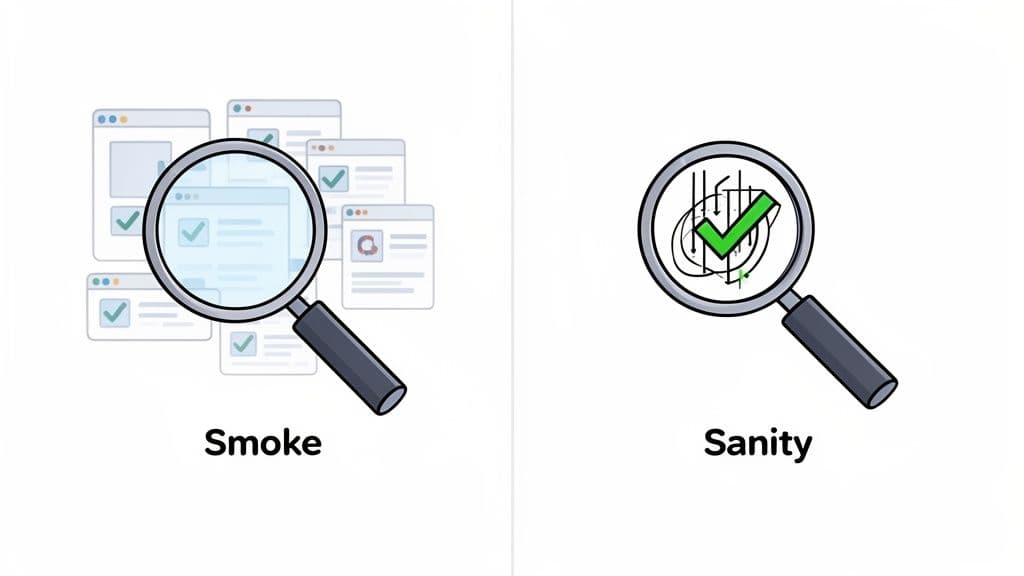
To really drive the point home:
- Purpose: Smoke testing is all about build stability. Sanity testing is about validating the logic of a recent change.
- Depth: Smoke tests go wide, touching many core features on the surface. Sanity tests go deep, focusing intensely on one specific module or area.
- Trigger: A new build kicks off smoke testing. A bug fix or minor code push triggers sanity testing.
The table below breaks down these key differentiators, offering a clear snapshot of where each testing method fits within a modern development workflow.
Smoke vs Sanity Testing At a Glance
This table gives a quick overview comparing the primary attributes of smoke and sanity testing, making it easy to see their distinct roles at a glance.
| Attribute | Smoke Testing | Sanity Testing |
|---|---|---|
| Primary Goal | Verify build stability and core functionality. | Validate bug fixes and new features. |
| Scope | Broad and shallow, covering end-to-end critical paths. | Narrow and deep, focused on specific modules. |
| Timing | Performed on a new, often unstable, build. | Performed on a stable build after minor changes. |
| Documentation | Usually scripted and automated. | Often unscripted and performed manually. |
| Ownership | Typically developers or a CI/CD process. | Almost always QA engineers or testers. |
| Analogy | A quick check for smoke after turning on a new device. | A focused check to see if a repair was successful. |
Ultimately, both are critical first-line defenses in quality assurance, just applied at different moments and for very different reasons.
Understanding Smoke Testing: Your First Line of Defense
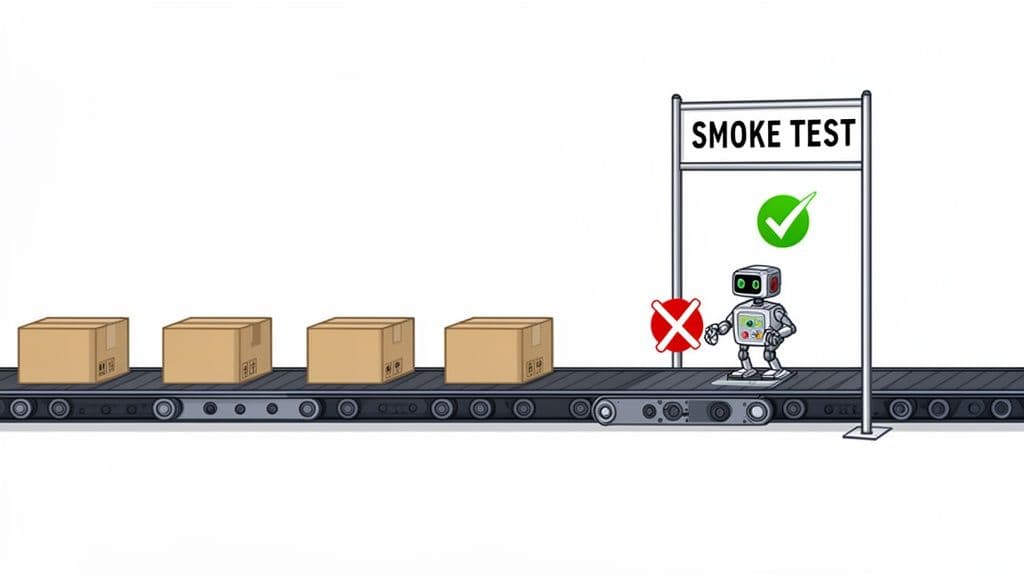
Think of smoke testing as the bouncer for your software build. It’s the very first checkpoint, a quick, high-level inspection designed to answer one simple question: "Is this build stable enough to even bother testing further?"
The name comes from a wonderfully direct practice in hardware engineering. You'd power up a new circuit board for the first time, and if it started smoking, well, you knew you had a major problem. In software, it’s the same idea. We're looking for those glaring, show-stopping failures that tell us to send the build straight back to the developers.
This isn't about deep-diving into bugs. The goal is to reject a fundamentally broken build right away, saving the QA team from wasting hours on something that's dead on arrival. If the core features are down, there's no point moving on to more detailed tests.
Core Characteristics of a Smoke Test
A good smoke test suite is all about breadth, not depth. It’s intentionally broad and shallow, touching the most important features without getting lost in the weeds of edge cases or complex user flows. Speed is the priority here, especially in CI/CD pipelines where fast feedback is everything.
The numbers back this up. In a survey of over 500 development teams, PractiTest found that 92% rely on smoke testing as their initial quality gate. These tests are effective, too, catching around 65% of critical failures before a build ever reaches the next stage. By checking end-to-end flows like login, dashboard access, and key transactions, teams can quickly validate that a build is worth testing more thoroughly. You can dig into the full details in the PractiTest survey findings.
Smoke testing is the ultimate gatekeeper for a CI/CD pipeline. A failed smoke test is a hard stop. It's an immediate signal to reject the build and send it back to development, keeping unstable code out of your testing environments.
Practical Examples of Smoke Test Cases
Let's make this real with an e-commerce app. A solid smoke test wouldn't check every single filter or payment option. Instead, it would focus only on the absolute must-have user journeys.
Here’s what that looks like:
- User Authentication: Can a user log in? Can they log out?
- Core Navigation: Do the main navigation links (Home, Products, Cart) actually work and go to the right place?
- Key Page Load: Does the homepage load without blowing up? Can you get to a product page and see products?
- Critical Action: Can a user add an item to their cart?
Each of these is a pass/fail check on a piece of mission-critical functionality. Since these tests are almost always automated, knowing when to choose between manual testing vs automation is key to building a workflow that doesn’t slow you down. If any of these basic actions fail, it points to a serious problem, and there’s no sense in testing anything else.
Understanding Sanity Testing: The Focused Health Check
While smoke testing is your first line of defense for a new build, sanity testing is the specialist you call in afterward. Think of it as a targeted, post-fix validation that happens once you already have a relatively stable build. The core mission is simple: verify that a specific bug fix or a minor new feature works exactly as intended.
Imagine a developer just fixed a bug in the payment form. A QA engineer doesn't need to re-test the entire application. Instead, they’ll run a quick sanity test, focusing intently on the payment module to confirm the fix works. They'll also check for any obvious, immediate side effects, like whether the "Add to Cart" button suddenly stopped working.
This makes sanity testing a lean, fast subset of regression testing. It's all about getting rapid feedback on small changes without kicking off a massive testing cycle.
The Scope and Objective of Sanity Tests
Sanity testing works with a narrow and deep scope. It doesn't cast the wide net of a smoke test; it drills down into a specific module or component. The main goal isn't to sign off on overall build stability, but rather to confirm the "sanity" of a recent change before that build moves on to more exhaustive testing.
This focused approach is incredibly efficient. A Katalon study of 300 SaaS teams found that sanity test suites usually contain just 15-20 test cases and often wrap up in about 10-15 minutes. Despite being quick, these checks are powerful, preventing an estimated 32% of bugs from ever reaching production. For product managers trying to maintain strict service-level agreements (SLAs), this kind of quick validation is a lifesaver. You can dig into more of the data in this GeeksforGeeks comparison.
Sanity testing is your first logical check after a code change. It quickly answers the question, "Does this specific fix make sense?" before you invest time and resources in a full regression cycle.
Common Scenarios for Sanity Testing
Sanity testing really proves its worth in a few common, everyday development situations. It’s often unscripted, relying on the tester’s intuition to logically probe the part of the application that was just changed.
Here are a few classic use cases:
- Post-Bug Fix Verification: A bug was causing incorrect calculations in an invoice generator. After the fix, a sanity test would involve creating a new invoice to confirm the math is now correct and that you can still save or print it without a problem.
- Minor Feature Enhancement: A new sorting option was just added to the product search results page. The sanity test would verify that the new sort works as expected and doesn't mess with any of the existing filters.
- After a Hotfix Deployment: A critical security patch just went live. A sanity test immediately follows to ensure the patched component is still functional and users can still access the application.
In every case, the focus is precise and the goal is clear: validate the change and check for any glaring, immediate side effects.
Key Differences and When to Use Each Method
While you’ll often hear smoke and sanity testing mentioned in the same breath, they are absolutely not interchangeable. The real difference comes down to their purpose and timing. Think of it this way: smoke testing asks, "Is this new build stable enough to even start testing?" Sanity testing, on the other hand, asks, "Did our recent change fix the bug without breaking anything obvious right next to it?"
Getting this distinction right is key to deploying the right test at the right time. A smoke test is a broad, shallow check on a brand-new build. A sanity test is a narrow, deep dive on a build that’s already considered stable but just had a small tweak.
Scope and Objectives: A Wide Net vs. a Laser Beam
The biggest difference is scope. Smoke testing is all about casting a wide net. It quickly touches on all the critical, end-to-end user workflows to make sure the application is generally stable. Its goal isn't to hunt for bugs, but to confirm the build won't just fall over under basic use. It's like checking if the foundation of a new house is solid before you start putting up walls.
Sanity testing, in contrast, is more like a laser beam. Its scope is hyper-focused on a specific module or feature that was just changed or fixed. The objective here is to validate that one specific change works correctly and didn't cause any immediate, logical side effects in related areas.
This decision tree shows exactly when sanity testing comes into play—after you have a stable build with a new code change.
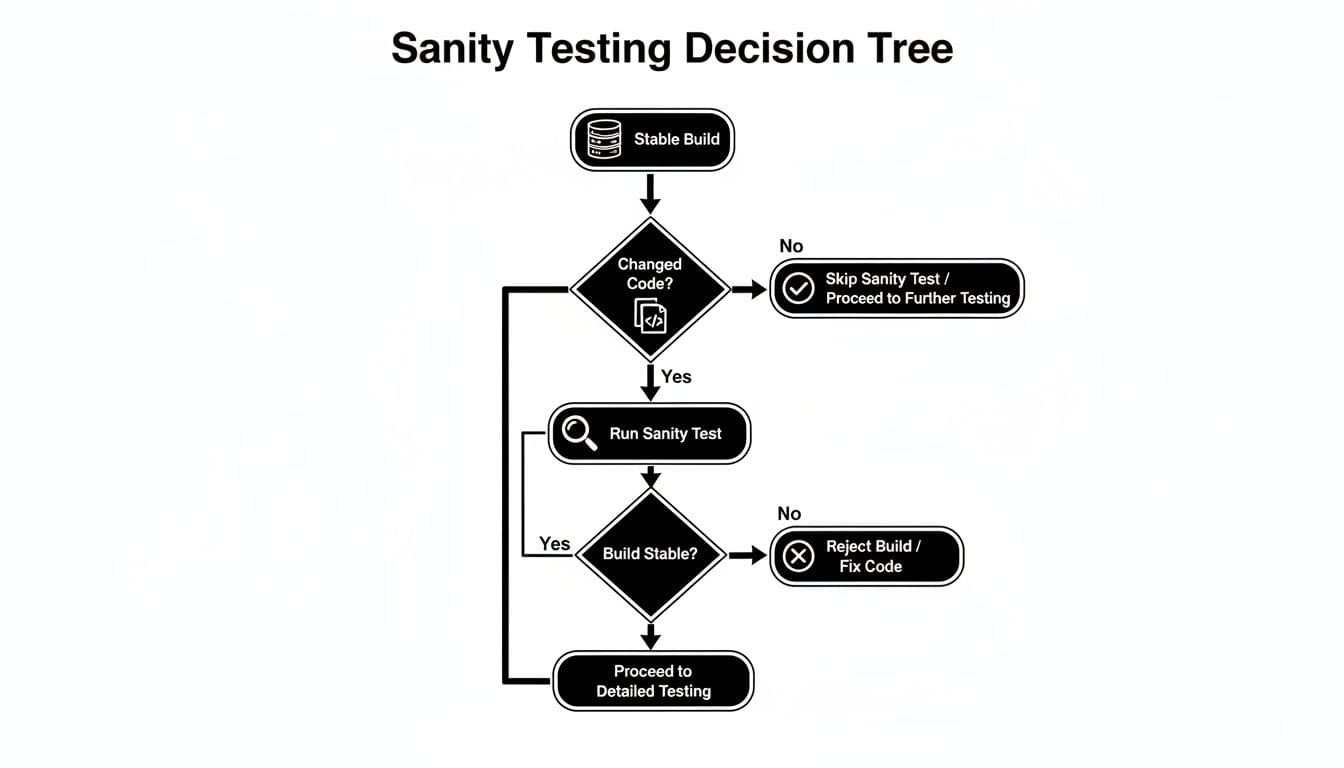
The main takeaway is that sanity testing is a targeted response to a specific code modification on an already stable system.
Timing and Triggers: Post-Build vs. Post-Fix
Their place in the development lifecycle is also completely different. Smoke testing is the very first check you run on a new build after it's deployed to a QA environment. If a smoke test fails, the build is rejected on the spot, saving the team countless hours of wasted effort on a broken foundation.
Sanity testing happens much later, on a build that has already passed its smoke test and is known to be stable. It's only triggered after a bug fix or a minor enhancement has been applied. It acts as a quick, final check before the build moves on to more comprehensive testing, like a full regression suite. You can learn more about where this fits in by exploring these regression testing best practices.
Automation and Ownership: CI Servers vs. QA Engineers
Who owns the test and how it's run also draws a clear line between the two.
- Smoke Testing: This is almost always fully automated and baked right into the CI/CD pipeline. Ownership usually falls to DevOps or the development team because it’s an automated quality gate for the build process itself.
- Sanity Testing: This is often manual and unscripted, leaning on a QA engineer's expertise to logically poke and prod the changed functionality. Because it requires a real understanding of the fix's context, it’s firmly owned by the QA team.
Smoke testing is about process and stability—a machine-driven check. Sanity testing is about logic and reason—a human-driven validation of a specific change.
To make these distinctions even clearer, here’s a side-by-side comparison.
Detailed Comparison of Smoke and Sanity Testing
This in-depth breakdown clarifies the distinct roles of each testing methodology across key operational criteria, helping you choose the right approach for any situation.
| Criteria | Smoke Testing | Sanity Testing |
|---|---|---|
| Primary Objective | To verify that a new build is stable enough for further testing. | To verify a specific bug fix or new feature works as intended. |
| Scope of Testing | Broad and shallow, covering critical end-to-end functionalities. | Narrow and deep, focusing on a specific module and related areas. |
| Triggering Event | A new software build is created and deployed. | A minor code change or bug fix is applied to a stable build. |
| Typical Automation | Highly automated; runs as part of the CI/CD pipeline. | Often manual and unscripted; can be partially automated. |
| Build State | Performed on a new, potentially unstable build. | Performed on an existing, stable build. |
| Team Ownership | Development or DevOps teams, as part of the build process. | QA engineers or dedicated software testers. |
Ultimately, this table highlights how these two testing types, while both essential, serve very different functions at very different stages of the development cycle.
Weaving Smoke and Sanity Tests into Your CI/CD Pipeline
In any modern CI/CD pipeline, the game is all about speed and reliability. Getting fast, meaningful feedback without gumming up the development works is the goal. This is exactly where understanding the difference between smoke and sanity testing pays off, as they act as automated quality gates at different points in the process.
Smoke tests are your first line of defense. They should be configured to run automatically the second a build is successfully compiled. Think of it as a bouncer at a club; if the build can't even perform its most basic, critical functions, it gets rejected on the spot. No need for human eyes, and no more time wasted on a version that's fundamentally broken.
Automating the Quality Gates
Sanity testing, on the other hand, is more of a specialist. You wouldn't run it on every single build. Instead, it's triggered by specific events, like when a developer merges a bug fix into the main branch. This targeted check validates that the new changes are solid and haven't introduced any obvious, foolish errors before the code moves on to a full, time-consuming regression suite.
This diagram shows how these two types of tests fit into a standard CI/CD workflow, each serving a distinct purpose at a different stage.
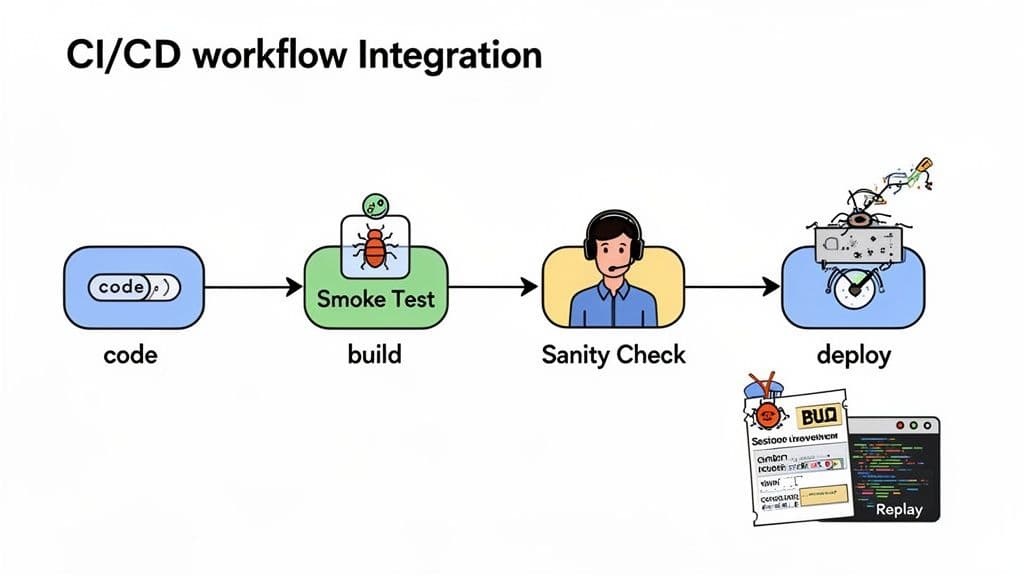
By structuring your pipeline this way, you confirm broad stability first with a smoke test, then follow up with a focused check on recent changes using a sanity test.
Making Bug Reports Actually Useful
When a test fails in an automated pipeline, the real work begins: figuring out why. All too often, a failed test creates a vague bug ticket that sends a developer on a wild goose chase trying to reproduce the problem on their own machine. This manual back-and-forth is a massive productivity killer.
This is where modern bug reporting tools completely change the game.
A failed test is only useful if it tells a clear story. Without context, a bug report is just noise. The goal is to give developers everything they need to fix the issue on the first try, not to start a long investigation.
Tools like Monito help with this workflow. When its browser test fails, the run report includes captured actions, screenshots, console logs, and network requests. Runs without a login include video; logged-in runs get a masked checkpoint replay.
This rich, contextual data gets attached directly to the bug ticket in Jira, Linear, or whatever system you use. For a developer, this is gold. Instead of guessing what went wrong, they get an instant, detailed replay. It virtually eliminates the need for manual reproduction, slashes triage time, and lets them get straight to fixing the actual code.
To truly unlock the speed CI/CD promises, you need to think about smarter automated testing strategies. For a deeper dive, check out our guide on automated testing best practices to build a more resilient pipeline.
Common Questions About Smoke and Sanity Testing
Even when the definitions seem straightforward, questions always pop up when teams try to put smoke and sanity testing into practice. Knowing which test to run and when is what separates a good QA process from a great one. Let's dig into some of the most common questions to clear up the confusion.
Getting these details right helps clarify the subtle but critical differences between smoke and sanity testing, so your team can use each one effectively.
Can Smoke and Sanity Testing Be Automated?
Yes, but how you automate them is completely different.
Smoke testing is a perfect candidate for complete automation. Its job is to check stable, critical paths—things like user login, core navigation, or adding an item to a cart. These are ideal for scripting. Once written, these scripts can run automatically as part of your CI/CD pipeline after every single build, serving as a first line of defense.
Sanity testing is a different story. While you can automate parts of it, it’s often done manually. Because it focuses on brand-new features or specific bug fixes, the tests are more fluid and less predictable. You often need a human's intuition to poke around related areas and spot logical issues a script would never catch. Automating it completely often misses the point.
Is Sanity Testing a Type of Regression Testing?
This is a classic point of confusion. The short answer is that sanity testing is a small, informal subset of regression testing. Think of it as a quick spot-check.
A full regression suite is a massive, time-consuming effort. It's designed to re-run a huge number of tests to make sure new code hasn't accidentally broken something somewhere else in the application.
Sanity testing, on the other hand, is a quick look at just the part that was changed and its most immediate neighbors. It's asking a simple question: "Does this new feature or fix seem to be working on a basic level?" It happens before you invest the time and resources into a full regression cycle.
A passed sanity test gives you the green light to proceed to full regression testing. A failed one saves everyone hours of wasted effort on a build that’s already broken.
Who Is Typically Responsible for Each Test?
Ownership usually falls to the team whose workflow the test supports.
Smoke tests are frequently owned by the development or DevOps team. Since they're baked right into the automated build process, they act as an engineering gate. They confirm a build is stable enough to even be handed over for further testing.
Sanity testing is almost always handled by QA engineers or testers. This makes sense because it requires a deeper understanding of the feature or bug that was just fixed. A tester uses their expertise to not only validate the fix but also to check for any obvious side effects—a task that requires more context than just looking at the code.
How Do Modern Tools Improve These Testing Types?
Modern debugging tools make both processes much less painful.
For automated smoke tests, a failure in the CI pipeline can trigger a tool like Monito to automatically capture the entire failed session. This gives developers a screen recording, console logs, and network requests, providing immediate context so they can fix the issue without having to reproduce it themselves.
For manual sanity testing, a QA engineer can have a tool recording their session in the background. If they find a bug, they can generate a developer-ready report with all the technical details in a single click. This drastically cuts down the time spent on writing bug reports and gets fixes out the door faster.
Bug reporting shouldn't slow you down. With Monito, you can turn complex bugs into clear, actionable reports in one click. Capture session recordings, console logs, and network activity automatically, so your developers can stop guessing and start fixing. Learn more and get started for free at Monito.dev.